Your Google Business Profile Got Suspended. Here's Exactly What to Do.
One day your phone is ringing. The next day it stops. You haven't changed anything. Your website is fine. But when you search your own business on Google Maps, it's gone.
That's what a Google Business Profile suspension looks like from the inside. It's one of the most disorienting things that can happen to a local business online — and in 2026, it's happening more frequently as Google ramps up AI-driven fraud detection that catches legitimate businesses in algorithmic sweeps alongside the bad actors.
The good news: most legitimate businesses can get reinstated. The bad news: most first-time appeals fail because the business owner doesn't know the specific process. This guide covers what you need to know.
First: Understand What Type of Suspension You Have
Not all suspensions are the same, and the recovery path is different for each.
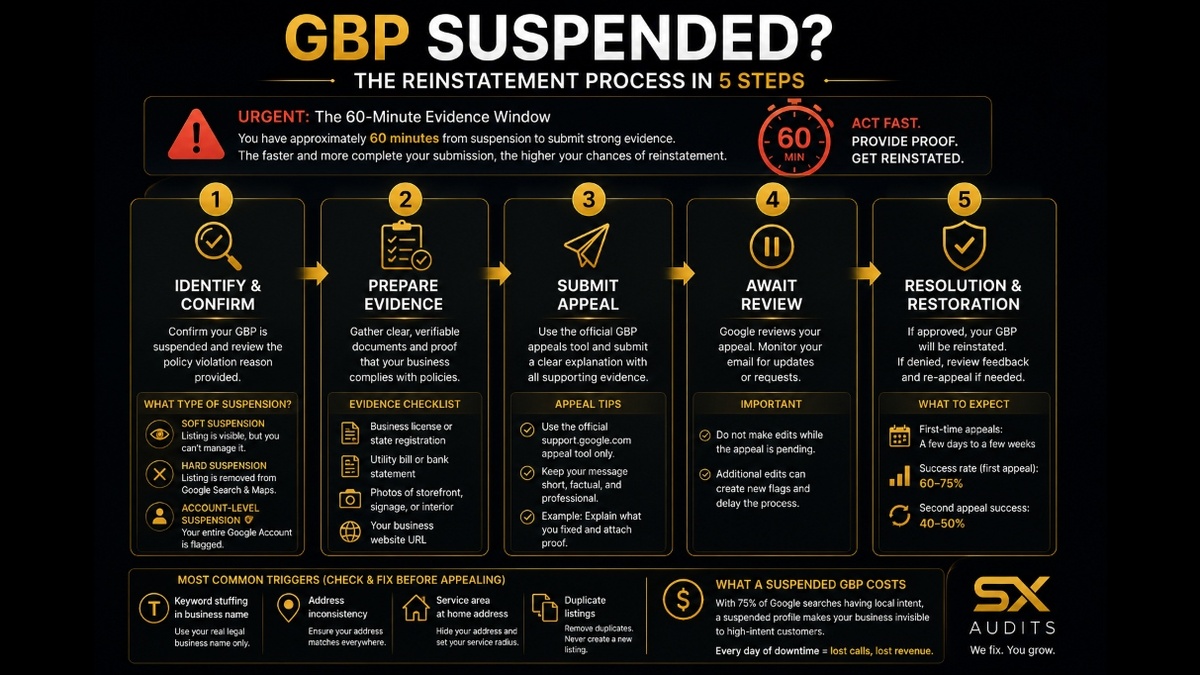
Soft suspension
Your listing is still visible on Google, but you've lost the ability to manage it. You'll see a "Suspended" notice inside your Google Business Profile dashboard. This is the more recoverable of the two.
Hard suspension
Your listing has been completely removed from Google Search and Maps. Customers searching for your business by name may not find a Maps listing at all. This requires a full reinstatement appeal.
Account-level suspension
If your entire Google Account has been flagged, every business profile you manage gets suspended automatically. You must resolve the account restriction before addressing individual profiles.
The Most Common Triggers (Check These First)
Google rarely tells you exactly why it suspended your profile. Before you appeal anything, audit your profile for these specific triggers — fixing the underlying issue is what determines whether your appeal succeeds.
Keyword stuffing in your business name
If your GBP name says "Best Plumber Brooklyn | 24hr Emergency Service" instead of your actual legal business name, that's an immediate suspension trigger. Your GBP name must match your real-world business name exactly. Nothing added.
Address inconsistency
Your address on your GBP must match your website, your state business registration, and your physical signage. A suite number written differently across platforms ("Ste 4" vs "Suite 4") can create a trust gap Google's systems flag.
Service area businesses listed at a home address
If you operate from home and set your GBP to display your home address, Google may suspend it when the address doesn't match commercial signals. Service area businesses should hide their address and define their service radius instead.
Duplicate listings
If there are multiple GBP listings for the same business — even ones you didn't create — Google may suspend both. Never create a new listing to replace a suspended one. That accelerates the problem.
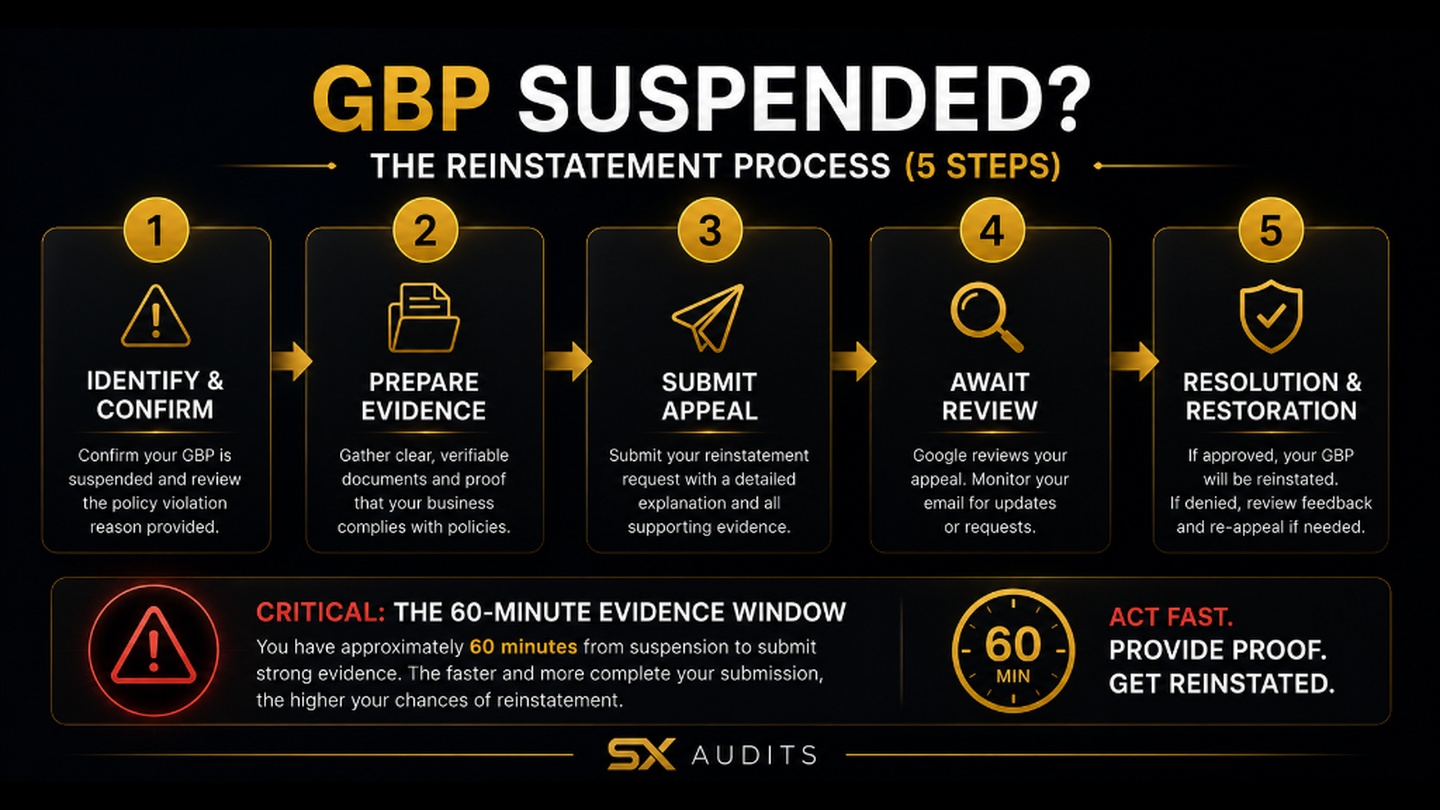
The Reinstatement Process (Step by Step)
Step 1 — Fix the issue before you appeal This is the step most people skip. Submitting an appeal before correcting the violation is the most common reason first attempts fail. Go through the triggers above, fix every issue you find, and document the changes.
Step 2 — Prepare your evidence package Before opening the appeal tool, have these documents ready. Google gives you only 60 minutes to upload evidence once you start — if you're not prepared, the window closes and your evidence won't attach.
Documents to gather:
- Business license or state registration showing your legal business name and address
- A utility bill or bank statement with the business name and address
- Photos of your storefront, signage, or interior showing your business operates at that location
- Your business website URL
Step 3 — Submit through the official appeals tool Use the Google Business Profile appeals tool — search "Google Business Profile appeal tool" and use the official support.google.com link. Sign in with the Google Account that manages the profile. Do not create a new account.
Write your appeal message like you're helping a reviewer close a case quickly. Short, factual, no emotion. Example:
"My Business Profile for [Legal Business Name] was suspended. I've reviewed Google's guidelines and corrected the listing to match our real-world business information. I've attached our business license and storefront photos confirming our business name, address, and operations."
Step 4 — Do not make edits while the appeal is pending Once submitted, do not touch the profile. Additional edits during review create new flags and extend the timeline.
Step 5 — Timeline and what to expect The backlog that plagued 2025 cleared in early 2026. First-time appeals currently process in a few days to a few weeks. First-time appeals with clean evidence see a 60–75% success rate. Second appeals drop to 40–50%. This is why getting the first submission right matters.
If your first appeal is denied, you can submit one additional review with new evidence you didn't include the first time. After that, options become limited.
What a Suspended GBP Actually Costs
For most local businesses, Google Maps is the primary source of new inbound customers. With 75% of all Google searches having local intent, a suspended profile effectively makes your business invisible to the highest-intent search traffic that exists — people searching for exactly what you offer, right now, near your location.
The reinstatement timeline of one to five weeks means weeks of suppressed inbound calls, walk-ins, and direction requests. For a service business averaging $3,000 in monthly Google Maps-driven revenue, even a three-week suspension represents $2,000+ in direct losses — before accounting for customers who found a competitor and stayed there.
Want a professional eye on your profile before you appeal?
We review your full GBP setup, flag risk factors, and deliver findings in 72 hours. No discovery call.
Book the Audit →Related intelligence · selected for this topic
Framework developer and systems thinker specializing in AI implementation and decision architecture. Creator of the AI Council methodology — a structured multi-model framework used to surface deeper insights in complex decisions. The audit intelligence at Sovereign X Audits is built on these same principles.
aicouncilconductor.com →Find out exactly where your business stands.
We audit your digital infrastructure, AI visibility, and brand presence — and show you exactly what it's costing you.